The main difference between cloud access control vs on premise access control is where the software runs. With a cloud-based system, your provider hosts the software, so you can manage the building access online. An on-premise system runs on a local server, giving you direct control over how your data is stored and managed.
Since 1985, Infassure has designed and installed access control systems for a wide range of commercial facilities. We work with offices, hospitals, hotels, houses of worship, and industrial sites in Dallas, Houston, and nationwide.
In this guide, we’ll explain how each system works and what to consider when choosing one for your facility.
Key Takeaways
- Cloud-based access control makes it easier to manage doors across different locations without maintaining an on-site server.
- On-premise access control gives you more control over your data, but your IT team takes on the responsibility of maintaining the system.
- Hybrid access control lets you use cloud-based features while keeping parts of your existing system on site.
What Is On Premise Access Control?
An on-premise access control system runs on equipment installed within your facility. A local server stores user records and access permissions, which door controllers use to determine who can enter different areas of the building. The server also maintains a record of access events.
Because the infrastructure is housed at your facility, your organization is responsible for maintaining the hardware and software. This gives your IT team the freedom to schedule updates, perform backups, and make upgrades based on your needs.
What Is Cloud Based Access Control?
Cloud-based access control works much like the online services many businesses use for email and payroll. Instead of running the software on a local server, a cloud provider hosts it in a data center and handles server maintenance. You can then manage building access through a web browser or mobile app.
While the software moves to the cloud, the physical equipment stays at your facility. You’ll still need card readers, electronic locks, and door controllers to manage entry at each access point.
Public and Private Cloud Options
Access control platforms can run on either a public or private cloud. A public cloud uses shared infrastructure to serve multiple customers, while a private cloud dedicates resources to a single organization.
Larger businesses may prefer a private cloud if they need greater separation between their systems and those of other customers. With either option, your organization can reduce the amount of server hardware it maintains on site.
Cloud Access Control vs On Premise
Although both systems help secure your building, they differ in how much time and money it takes to manage them. The comparison below highlights the factors that can affect your decision.
| Factor | Cloud Access Control | On Premise Access Control |
|---|---|---|
| Where the software runs | Provider’s data center | Local server at your facility |
| Upfront cost | Usually lower | Usually higher |
| Ongoing cost | Recurring subscription | IT support and hardware upgrades |
| Updates | Managed by the provider | Managed by your team |
| Remote management | Built into most platforms | May require additional setup |
| Scalability | Easy to add doors and locations | May require more servers or licenses |
| Internet dependence | Requires internet for remote management | Can run on a closed local network |
| Data control | Based on your agreement with the provider | Directly managed by your organization |
Security and Data Protection
Both access control models can provide strong security when properly maintained. The difference lies in how security responsibilities are divided between your organization and the technology provider.
Security in the Cloud
Reputable cloud providers use encryption and continuous monitoring to protect their platforms. For businesses with limited IT resources, these safeguards can reduce the burden of managing security internally.
Under the shared responsibility model, the provider protects the cloud infrastructure while your organization manages user accounts and access permissions. It’s also important to understand where your provider stores access data and how it uses that information.
Security On Premise
With an on-premise system, you have direct control over who can access your server and which networks can connect to it. This can be an advantage for facilities that handle sensitive information, provided their IT teams have the resources to keep the system secure. Regular security patches and network monitoring are essential to reducing vulnerabilities.
Access Permissions
Regardless of which system you choose, assigning permissions based on employee roles helps prevent unnecessary access to restricted areas. Multi-factor authentication adds another layer of protection for administrative accounts, while regular permission reviews and audit logs help support compliance.
Physical Security
Door controllers and wiring need protection from tampering, even when your software runs in the cloud. Additional security measures, such as door position sensors, can help identify potential security issues. These physical safeguards should form part of your overall access control system design.
Cost and Software Licenses
The initial cost of an access control system doesn’t always reflect what you’ll spend over its lifetime. On-premise systems usually require a larger upfront investment because you need to purchase server hardware and software licenses. After installation, your main expenses typically include technical support and periodic equipment upgrades.
Since cloud-based systems don’t require a dedicated on-site server, the initial investment is usually lower. Instead, you pay a recurring subscription fee that typically covers software
To get a more accurate picture of your investment, compare the total cost of each system over five to ten years. Your calculations should include:
- Hardware, installation, and structured wiring
- Costs of adding doors, users, or buildings
- Additional technical support and service fees
- IT hours needed for maintenance and troubleshooting
Scalability and Multi-Site Management
One advantage of cloud-based access control is how easily it can grow with your business. As you add doors or buildings, you can connect new controllers to your existing platform and manage them from the same dashboard.
For example, a property manager overseeing ten buildings can manage security across all locations from one account. This approach also works well for school districts that need to extend access control to new campuses.
Expanding an on-premise system often requires more planning. Depending on your setup, you may need additional software licenses or greater server capacity. These requirements may be manageable at a single location but become more complex as you add buildings to your network.
Remote Management and Remote Access
Remote management allows your team to handle access requests without being physically present at the facility. While both systems can offer this capability, an on-premise setup may require additional network configuration.
Managing Doors From Anywhere
Most cloud platforms include remote management features that let administrators update permissions and review access activity from any connected device. This can be especially useful outside regular business hours when security staff may not be on site.
If an employee loses a badge in the evening, for example, an administrator can deactivate it without having to return to the building.
Reaching an On Premise System
To manage an on-premise system from another location, your IT team may need to set up a secure virtual private network (VPN). Although this requires additional maintenance, it allows staff to connect remotely without exposing the server to the public internet.
Temporary Access for Visitors and Contractors
Not everyone entering your building needs permanent access. Temporary credentials allow visitors and contractors to enter designated areas for a set period, after which their permissions expire automatically.
Cloud platforms make it easy to issue these credentials remotely, while on-premise systems can provide similar features with the right network setup.
Reliability, Internet Connectivity, and Local Control
An important part of choosing an access control system is understanding what happens when the internet goes down or equipment fails. With the right setup, both models can continue to support building access during certain interruptions.
Cloud Systems During an Outage
A well-designed cloud system stores access permissions on local door controllers. If the internet connection fails, these controllers can continue processing existing credentials and recording access events.
People can still enter authorized areas during the outage, although administrators may need to wait for the connection to return before making changes or viewing live reports.
On Premise Systems During a Failure
Because on-premise systems rely on a local network, staff can continue managing access even when internet service is unavailable. However, problems can arise if the local server itself fails.
Without a backup system, administrators may be unable to issue new credentials or retrieve reports until the server is restored.
Regulatory Compliance
For industries such as healthcare, government, and finance, regulatory compliance can influence where access data is stored and who can view it. Your organization may also need to keep access logs for a specific period.
Many cloud providers offer security certifications and reports that can help you prepare for audits. However, you’ll still need to confirm that your chosen platform supports the requirements your organization must follow.
An on-premise system gives you direct control over data storage, which may simplify certain aspects of compliance. In return, your IT team takes on more responsibility for documenting security updates and reviewing user access.
Connecting Access Control to Other Systems
An access control system becomes more useful when it works alongside other building technologies. Integrating it with video surveillance, for example, allows security teams to review camera footage linked to a specific door event.
Business intercom systems let staff speak with visitors before granting entry. For emergencies, fire alarm integration allows designated locks to release in line with fire and life safety requirements.
Both cloud-based and on-premise systems can support these integrations, but compatibility varies by platform. Before making a decision, check whether the system works with the security equipment already installed at your facility.
Where Hybrid Access Control Fits
Choosing between cloud-based and on-premise access control doesn’t always mean committing to one model. A hybrid system lets you retain parts of your local infrastructure while introducing cloud-based features.
Some organizations keep their door controllers and database on site while using a cloud platform for remote management and reporting. Others retain an existing server and introduce cloud features as their needs change.
These configurations allow businesses to modernize their security infrastructure without replacing all their equipment at once.
Infassure designs and installs all three types of systems, allowing us to tailor your access control solution to your facility’s requirements.
Which Option Fits Your Building?
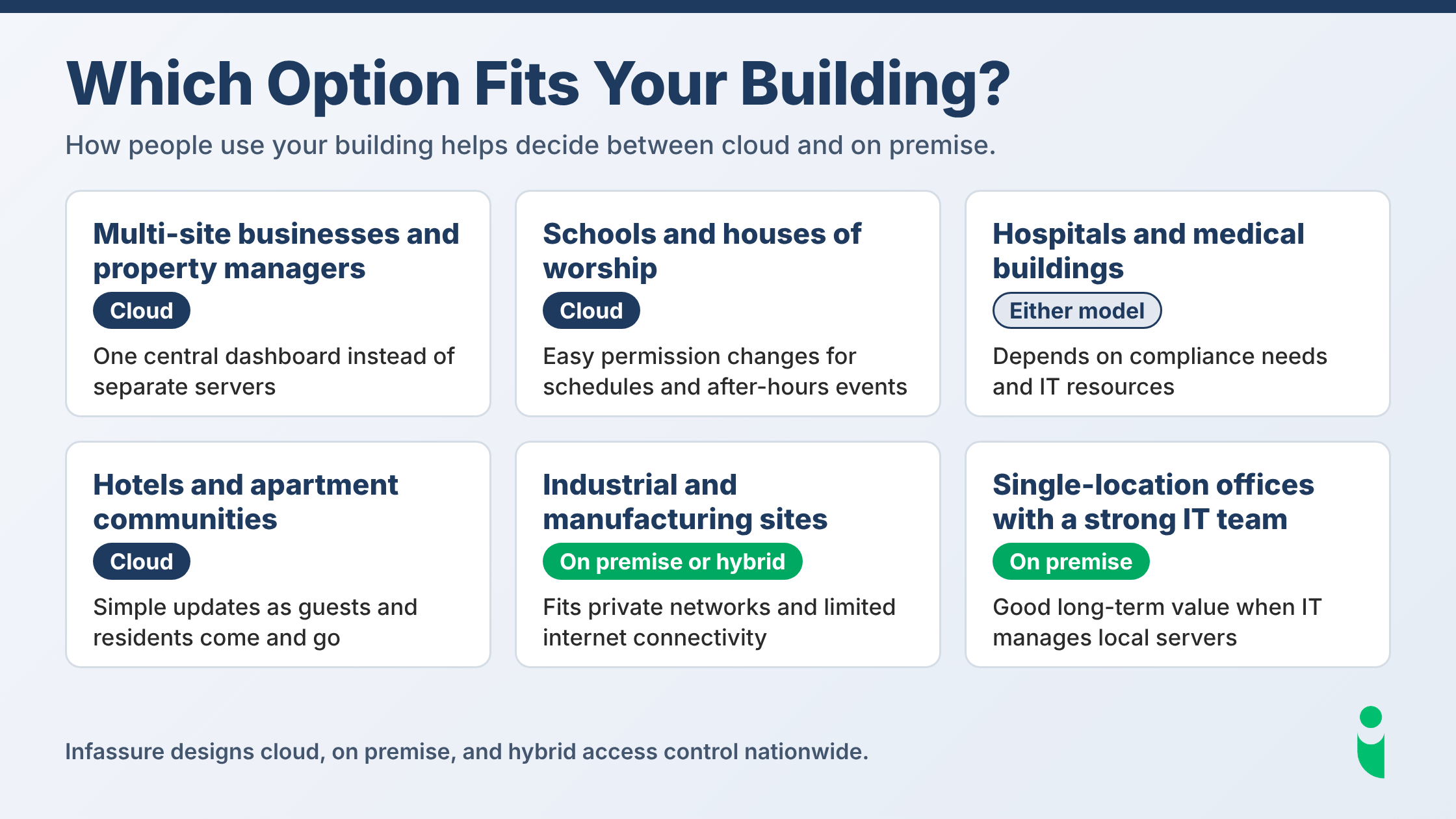
The way people use your building plays an important role in determining which access control system is right for you. Consider how each model can support the security needs of different commercial facilities.
Multi-Site Businesses and Property Managers
For organizations managing several properties, cloud-based access control can reduce the work involved in overseeing each location. Administrators can manage permissions from a central dashboard instead of maintaining separate servers across their buildings.
Schools and Houses of Worship
Schools and houses of worship often rely on small teams to manage changing schedules and visitor access. A cloud-based solution can make these tasks easier, particularly when staff need to adjust permissions for after-hours events.
Hospitals and Medical Buildings
Both access control models can work well in healthcare facilities, where reliable security is essential to patient care. The right choice depends on your compliance requirements and whether your IT team has the resources to maintain a local system.
Hotels and Apartment Communities
With guests and residents coming and going, hotels and apartment communities need a convenient way to update access permissions. Cloud-based systems can simplify this process while supporting remote apartment gate security and entry management.
Industrial and Manufacturing Sites
Many industrial facilities operate critical equipment on private networks. For sites with limited internet connectivity or strict network security requirements, an on-premise or hybrid system may fit more naturally into the existing infrastructure.
Single-Location Offices With a Strong IT Team
Businesses operating from one location may find that an on-premise system offers good long-term value. If your IT team already manages local servers, it may have the resources to handle access control updates and backups as part of its existing responsibilities.
Talk With an Infassure Access Control Expert
For more than 40 years, Infassure has helped businesses find security solutions that fit the way they operate. Our certified team designs and installs access control systems based on your building’s layout and security requirements, with careful consideration of your existing technology and budget.
We provide installation and ongoing technical support throughout Dallas and Fort Worth, Houston, and nationwide. Whether you’re securing a new building or upgrading an older system, we can help you determine which access control model makes sense for your facility.
Request a quote today.