Updated September 22, 2026
Key Takeaways
- RFID access control uses an encrypted card, fob, or phone credential to unlock doors, log every entry, and manage access remotely.
- 13.56 MHz smart card credentials have replaced 125 kHz prox cards as the standard, since prox can be cloned in under a minute with a $50 tool.
- A full system has four parts: the credential, the reader, the control panel, and the electronic lock.
- Buildings still running prox cards don’t need a full rip-and-replace; multi-technology readers support a phased migration.
- Audit logs from RFID systems often double as the documentation HIPAA, PCI DSS, and NERC CIP audits require.
RFID access control is a system that uses radio frequency identification to unlock doors for authorized people. Each person carries a card, key fob, or phone credential with a unique encrypted ID.
A reader at the door picks up that ID, a control panel checks it against your access rules, and the lock releases if the person is allowed in. Every attempt, approved or denied, is recorded.
For most commercial buildings, RFID has replaced metal keys because it solves the problems keys can’t. You can add or remove a person’s access in seconds, give different people different doors and hours, and see exactly who came through and when.
This guide explains how the system works, what the pieces are, which card technology to use, and how to size a system for your building.
The Components of an RFID Access Control System
An RFID access control system has four main parts that work in sequence, and each one depends on the part before it to function correctly. Understanding what each piece does makes it easier to spot where a system might need an upgrade.
- The credential. A card, fob, or smartphone that carries a unique encrypted ID. Cards and fobs have no battery; the reader powers them when they come within range.
- The reader. Mounted beside each door or gate, the reader sends out a radio field, reads the credential’s ID, and passes it to the control panel. It doesn’t make the access decision. For a closer look at the hardware and the different reader types, see our guide to what a smart card reader is and how it works.
- The control panel. The brain of the system. It stores the access rules, checks each credential against them, and tells the lock what to do. Modern panels are cloud-managed, so an administrator can control multiple buildings from one dashboard.
- The electronic lock. A magnetic lock, electric strike, or motorized lock that releases when the panel approves the credential.
In a commercial install, these four parts tie into your cameras, alarm system, and network so the whole building security setup works as one system, rather than as separate tools that happen to share a building.

How RFID Access Control Works
The exact sequence happens in well under a second, but knowing each step helps when troubleshooting a denied entry or planning an integration with other systems. Here’s what happens every time someone presents a credential:
- An employee holds their card, fob, or phone near the reader.
- The reader energizes the credential and reads its encrypted ID.
- The reader sends that ID to the control panel.
- The panel checks the ID against its rules, confirming whether this person is allowed through this door at this time.
- If approved, the lock releases; if not, the door stays locked and an alert can be sent.
- Either way, the attempt is logged with a timestamp.
That log is the part building managers end up using most. It answers “who was in the server room Tuesday night?” in seconds, and for healthcare, finance, and critical infrastructure, it’s often the exact documentation HIPAA, PCI DSS, or NERC CIP audits ask for.
125 kHz vs. 13.56 MHz: Which RFID Should You Use?
RFID access credentials come in two main frequencies, and the difference matters more than most people realize. Choosing the wrong one isn’t just a performance issue, it’s a real security gap.
125 kHz, often called “prox” for proximity, is the older technology. Prox cards broadcast a fixed ID with no encryption, and anyone with a $50 cloner bought online can copy one in under a minute. If your building still uses prox cards, anyone who has ever borrowed a badge could have a working copy.
13.56 MHz, or smart card technology, is the current standard. The card and reader verify each other before any data moves, and the ID itself is encrypted, so these cards can’t be copied with consumer tools. The same frequency also supports mobile credentials on phones and watches
| 125 kHz vs. 13.56 MHz | 125 kHz (Prox) | 13.56 MHz (Smart Card) |
|---|---|---|
| Encryption | None | Yes |
| Can be cloned | Yes, in under a minute | Not with consumer tools |
| Read speed | Fast | Fast |
| Mobile credential support | No | Yes |
| Cost per card | Lowest | Slightly higher |
| Recommendation | Replace | Use for all new installs |
Types of RFID Credentials
Not every credential type suits every situation, and most buildings end up running more than one at once. Here’s what’s available and where each one fits best.
Key Cards. The standard badge, printed with a photo and name for visual ID as well as electronic access. This remains the most familiar option for employees and visitors alike.
Key Fobs. Small, durable, and hard to lose off a keychain. Fobs are common in industrial and multi-family settings where a wallet-sized card would be impractical.
Mobile Credentials. An app on the employee’s phone or watch, using NFC or Bluetooth with a compatible reader. There’s no physical item to issue, lose, or collect when someone leaves the company.
Vehicle Tags. Long-range active RFID tags for parking gates, readable from inside the car without the driver needing to stop and present a badge.
Most buildings end up with a mix: a phone credential for staff, cards for contractors and visitors, and vehicle tags at the garage.
Active vs. Passive RFID
RFID credentials fall into two categories based on how they’re powered, and the distinction determines what each type is actually suited for. Nearly every door in a commercial building uses one category almost exclusively.
Passive RFID credentials have no battery. The reader powers them when they’re within a few inches, which is why nearly all door access uses passive RFID: it’s cheap, reliable, and there’s nothing to charge or replace.
Active RFID credentials have their own battery and can be read from up to a few hundred feet away. They’re used for vehicle gates, large campus perimeters, and asset tracking, not for individual doors. For almost every commercial door, passive 13.56 MHz is the usual choice.
RFID vs. NFC Access Control
NFC is a type of RFID that operates at 13.56 MHz with a very short range, usually an inch or two, and it’s the technology built into most phones and smartwatches. In practice, the real question isn’t RFID versus NFC as competing technologies. It’s whether your readers support NFC so employees can use their phones instead of, or alongside, a physical card.
A reader that supports both 13.56 MHz cards and NFC gives you the most flexibility: cards for people who want them, phones for everyone else, and one set of hardware for both. Phone credentials also add a layer of protection, since most phones require a fingerprint or face unlock before the credential becomes available.
What to Look for in an RFID Access Control System
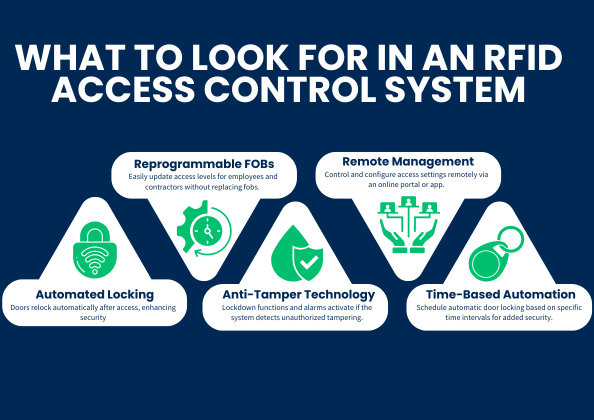
If you decide to use RFID access control in your business, a handful of specs will do most of the work of separating a good system from a mediocre one. These apply whether you’re outfitting a single office or a multi-building portfolio.
- Encrypted 13.56 MHz credentials. The single most important spec. Don’t install new prox.
- Cloud-based management. Add, change, or revoke access from anywhere, across every building, without visiting a server closet.
- Mobile credential support. Even if you start with cards, you’ll want the option.
- Multi-technology readers. These read prox, smart cards, and mobile, so you can migrate on your own schedule.
- Schedules and time-based rules. Doors that lock automatically at 6 p.m., contractors who can only enter Tuesday and Thursday, and so on.
- Automatic relocking. The door secures itself after each entry so nobody has to remember.
- Anti-tamper alerts. The system notifies you if a reader is pried off the wall or a door is propped open.
- Integration with cameras and alarms. A denied badge at the loading dock should pull up the camera feed, not just sit in a log.
- Audit reporting. Exportable logs for compliance, HR, and incident review.
No single system needs all nine of these on day one, but the more of them a system supports, the less likely you are to outgrow it within a few years.
Questions? Request a quote today.
Migrating From Prox Cards to Smart Cards
If your building runs on 125 kHz prox, moving to encrypted smart cards is likely the single highest-impact security upgrade available. The good news is that it doesn’t have to happen all at once.
- Audit what you have. Count readers, doors, and active credentials. Check whether the control panel supports 13.56 MHz.
- Install multi-technology readers. These read both old and new cards, so nothing breaks the day they go in.
- Issue new credentials in waves. New hires get smart cards or mobile credentials from day one. Existing staff swap over by department.
- Turn off prox. Once everyone has migrated, disable 125 kHz on the readers. The cloning risk is gone.
Most buildings complete this in a few months with no downtime. Infassure handles the reader install and cabling and works with your team on the credential rollout. Request a quote today.
Which RFID System Fits Your Building?
RFID access control works for nearly every commercial environment, but what you actually need depends heavily on your building type, headcount, and turnover. Here’s a quick reference to help narrow the decision.
Which RFID Access Control Setup Fits Your Building?
| Building type | What to prioritize |
|---|---|
| Small office, under 50 people | One or two 13.56 MHz readers, cloud management, mobile credentials |
| Multi-tenant or multi-floor | Centralized panel, per-tenant permissions, schedules, camera integration |
| Healthcare, hospitality, warehouses (high turnover) | Mobile credentials and reprogrammable fobs to cut card churn |
| Manufacturing and industrial | Zone-based access, weather-rated readers, vehicle gates |
| Schools and houses of worship | Scheduled unlocks for services or classes, one-button lockdown |
| High-security or regulated | Encrypted credentials, full audit logs, anti-tamper, two-factor at critical doors |
Most buildings don’t fit neatly into just one row. A multi-tenant medical office building, for example, benefits from both the multi-tenant and high-turnover columns at once, which is exactly the kind of layered requirement Infassure designs around.
RFID Access Control in Dallas, Fort Worth, Houston, and Nationwide
Infassure has installed commercial access control systems since 1985. Our Richardson office serves Dallas, Fort Worth, and the surrounding Metroplex, including Plano, Irving, Frisco, and Arlington. Our Houston office serves the Greater Houston area, including the Texas Medical Center, the Energy Corridor, and The Woodlands.
We also run multi-site projects for clients nationwide, so a company with buildings in Texas and elsewhere gets one team and one standard. We handle the full project: system design, structured cabling, reader and lock installation, integration with your cameras and alarms, and support after the install.
Ready to Replace Keys or Upgrade?
Request a quote or call (972) 680-7800 in North Texas or (281) 640-3326 in Houston. An Infassure team member will look at your building, your current system, and your goals, and give you a clear recommendation.

RFID Access Control FAQs
What is RFID access control?
RFID access control is a door security system that uses radio frequency identification. A card, fob, or phone carries a unique ID, a reader picks it up, and a control panel decides whether to unlock the door based on rules you set.
Is RFID access control secure?
It depends on the credential. Older 125 kHz prox cards can be cloned easily. Modern 13.56 MHz smart cards and mobile credentials are encrypted and can’t be copied with consumer tools. If you’re using prox, upgrading is the biggest security improvement you can make.
Can RFID access control work with my phone?
Yes. Most current readers support mobile credentials through NFC or Bluetooth, so an employee’s phone works like a badge. You’ll need a management platform that can issue mobile credentials.
What happens if the power goes out?
Access control panels run on battery backup, and locks are set to either fail-safe (unlock) or fail-secure (stay locked) based on fire code and the door’s purpose. Your installer configures this for each door.
How much does an RFID access control system cost?
A single-door system typically starts in the low thousands installed. Larger buildings scale with the number of doors, plus software licensing for cloud management. A site walk-through is the only way to get an accurate number.
Can I add RFID access control to an existing building?
Yes. Readers and locks can be retrofitted to most doors. The main variables are cabling runs and whether your existing doors and frames can accept an electric strike or maglock.